

We all use WhatsApp for daily conversations, but when it comes to using it for our enterprise, we face many challenges.
Data privacy, lack of customization, compliance risks, spam bans, poor system integrations and more made it difficult for us to work productively.
That’s why we decided to build a WhatsApp Clone App with complete feature customization and data control. Here is a clear step-by-step guide on how we built an enterprise messaging platform.
What Is a WhatsApp Clone?
A WhatsApp clone is a custom-built enterprise instant messaging platform that runs on infrastructure you own with WhatsApp features like chats, calls, media sharing and encryption.
Rather than having conversations routed through some third-party servers, you own the hosting, the code and every bit of data exchanged.
Common Challenges When Using WhatsApp for Enterprises
For small teams, the WhatsApp Business API is fine, but enterprises quickly outgrow it. Here’s why they build their own WhatsApp alternative instead of using some vendor-controlled platform:
- No Data Ownership – Your conversations and files are all stored on WhatsApp’s servers.
- Limited Customization – You get fixed features with no room for building custom workflows.
- Vendor Lock-in – Moving away later means importing years of chat history and rewriting integrations.
- No Source Code Access – You cannot fix bugs, change features or add functionality on your own terms.
- Compliance Gaps – Healthcare and finance are two industries that typically cannot compete for consumers.
- Usage Restrictions – WhatsApp Business API limits messages and requires template approval.
- Third-Party Dependency – Every policy change, price increase or outage on WhatsApp directly interferes with your operations.
- Weak Brand Identity – Conversation with WhatsApp branding ruins the enterprise experience.
Why Build an On-Premises WhatsApp Alternative?
Banks, healthcare providers and government agencies handle confidential data. They don’t want their customer or employee conversations on public third-party servers.
So, building a self-hosted enterprise messaging platform provides teams the control they want and eliminates the wait for vendor approvals. Here’s why that shift matters:
- Complete Data Ownership – Messages and files stay within your own network infrastructure.
- Full Source Code Access – You can fix, extend or rebuild any part of the platform.
- Private Deployment – The app runs on your own network and not a public cloud.
- Better Security – You create your own encryption, access rules and audit trails.
- Custom Branding – Run conversations on your own name, logo and theme that match your business.
- Deeper Customization – Features can be built around your enterprise workflow and needs.
- No Recurring Subscription Required – One-time license fees to own the messaging solution.
- Enterprise Integrations – Connect to your CRM, HRMS or internal tools natively.
How Does WhatsApp Clone Architecture Work?
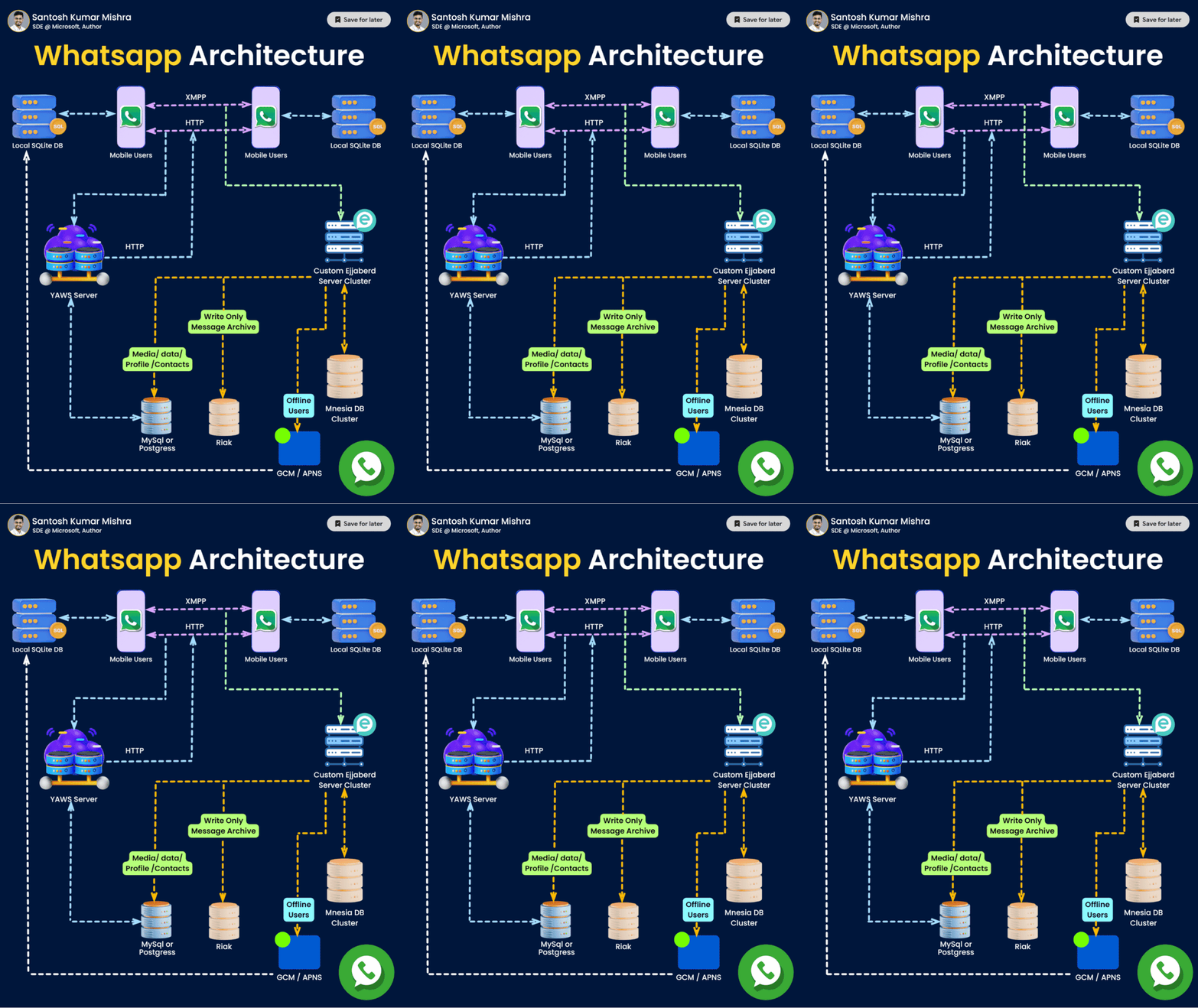
In a WhatsApp clone architecture, a message sent from the app establishes a persistent WebSocket connection to the messaging server through an API gateway.
The message is encrypted, validated, assigned an ID number, sent through a message queue like Kafka and stored in the database before being delivered immediately or queued for delivery if the receiver is offline.
Dedicated presence services keep track of online status and typing indicators, while media files are stored separately from the messaging database.
The 10 Best Features to Build a WhatsApp Clone for Enterprises?
Creating your own messaging platform requires more than basic chat. Enterprises need features that stand the test of time in the real world of business. The following are some of the key capabilities that make an enterprise WhatsApp alternative production-ready:
- Private & Group Chat – One-on-one and group conversations keep teams and departments connected.
- End-to-End Encryption – Only the sender and recipient can read messages containing confidential business data.
- Role-Based Access Control – Administrators assign permissions across teams so not everyone has the same access.
- Multi-Tenant Architecture – A single platform to serve multiple business units, clients or branches without separate infrastructures.
- Broadcast Messaging – Send announcements or updates to thousands of users at once without spamming individual chats.
- AI Chatbot Integration – You can now answer questions automatically, answer FAQs or recap missed conversations.
- Admin Dashboard & Analytics – You can see usage, activity and user statistics from a single control panel.
- HD Voice & Video Calling – Real-time calls powered by WebRTC for lag-free face-to-face conversations.
- Media & File Sharing – Easily exchange documents, images and videos without size limits and storage.
- Compliance Controls – Create custom data retention policies according to industry-specific regulatory standards.
- Single Sign-On (SSO) & MFA – Layered authentication is necessary to prevent unauthorized access to enterprise accounts.
- Custom Integrations – No third-party API limitations for native connections to CRM, HRMS or ERP systems.
These features help turn a simple chat clone app into an enterprise-grade secure internal messaging platform.
What is The Technology Stack For Building a WhatsApp Clone App?
The right tech stack determines whether your secure internal messaging platform scales or buckles under real load. A solid Technology stack combines a responsive frontend with a real-time backend to help you build an enterprise instant messaging app that handles thousands of concurrent connections.
i) Frontend Technology
Web, Android and iOS apps use different technologies to develop an app.
| Component | Web | Android (Mobile) | iOS (Mobile) |
|---|---|---|---|
| Programming Language | JavaScript/TypeScript | Kotlin | Swift |
| Real-time Messaging | WebSocket, Socket.IO | WebSocket, Socket.IO | WebSocket, Socket.IO |
| Media Capture | MediaDevices API | CameraX, MediaRecorder | AVFoundation |
| Push Notifications | Firebase Cloud Messaging | Firebase Cloud Messaging | Apple Push Notification |
| File Uploads | Fetch API, Axios | OkHttp, Retrofit | URLSession, Alamofire |
| Local Storage | IndexedDB, LocalStorage | Room Database, DataStore | Core Data, UserDefaults |
| UI Framework | React.js, Next.js | Jetpack Compose (or XML) | SwiftUI (or UIKit) |
ii) Backend Technology
Both web & mobile use the same backend technology for better control, response and user experience.
| Component | Web & Mobile |
|---|---|
| Programming Language | Java, Node.js (TypeScript), Python |
| Backend Framework | Spring Boot, NestJS, Express.js, FastAPI |
| Load Balancer / API Gateway | NGINX, Kong, HAProxy, AWS Load Balancer |
| Cloud Infrastructure | AWS, Google Cloud Platform (GCP), Microsoft Azure |
| Real-Time Messaging | WebSocket, Socket.IO, XMPP |
| Voice & Video Calling | WebRTC, STUN, TURN, SFU |
| Message Queue | Apache Kafka, RabbitMQ |
| Media Processing | FFmpeg |
| Media Storage | Amazon S3, Google Cloud Storage, Azure Blob Storage |
| Group Chats | WebSocket + Redis + Kafka/RabbitMQ |
| Content Delivery Network | CloudFront, Cloudflare CDN, Google Cloud CDN |
| Database | PostgreSQL, MongoDB, Cassandra |
| User Authentication | OAuth 2.0, JWT, OpenID Connect, Firebase Authentication |
| Security | TLS/SSL, End-to-End Encryption, AES, HTTPS |
| Monitoring & Logging | Prometheus, Grafana, ELK Stack, OpenTelemetry |
| Cache | Redis |
| Containerization | Docker |
| Container Orchestration | Kubernetes |
| Operating System | Ubuntu Server, Debian, Red Hat Enterprise Linux |
What is the Major difference Between Cloud vs Building an On-Premises WhatsApp?
The moment when we start comparing WhatsApp and a self hosted enterprise messaging platform side-by-side, the gap becomes very obvious. Here’s how a secure WhatsApp alternative for business stacks up against the standard consumer app:
| Capability | WhatsApp Business API | On-Premises WhatsApp Clone |
|---|---|---|
| Hosting Control | Cloud-hosted only | Self-hosted on your own servers |
| Source Code Access | None | Full source code access |
| Customization | Limited to templates | Unlimited branding & features |
| Data Ownership | Vendor-controlled | 100% yours to control |
| Pricing Model | Recurring usage fees | One-time perpetual license messaging platform |
| Compliance Fit | Fixed global policies | Tailored to your industry/region. |
How To Build A WhatsApp Clone App With MirrorFly IM Solution?
When I was searching for better ways to build a secure messaging app, I found MirrorFly IM solution and Sendbird. Where MirrorFly offered a self-hosted IM solution with source code access and real-time communication built in.
Let’s see how we developed an app like WhatsApp for our enterprise using MirrorFly SDK.
Step 1: Initial Setup
Install the dependencies and get your license key.
Requirements (Android, iOS, Web):
- Android Lollipop 5.0 and above (API Level 21)
- Java 7 and above
- Gradle 4.1.0 and above
- targetSdkVersion / compileSdk 34 and above
Get your license key:
If you’re already a registered user? Find it under Application Info in your account.
If not registered? contact the MirrorFly Team to set up your account.
1. Set up your project – Open a new or existing project in Android Studio.
2. Add the repository
For Gradle 6.8 and above, add to settings.gradle
For Gradle 6.7 or lower, add to root build.gradle
(Check the release notes for Gradle-specific details.)
dependencyResolutionManagement {
   repositories {
       mavenCentral()
       google()
       jcenter()
       maven {
           url "https://repo.mirrorfly.com/release"
       }
   }
}
3. Add dependencies – Add the required dependencies to app/build.gradle file.
dependencies {
  implementation 'com.mirrorfly.sdk:mirrorflysdk:7.13.7'
}
4. Update Gradle properties – Add the specified line to gradle.properties to avoid library conflicts.
android.enableJetifier=true5. Add permissions – Open AndroidManifest.xml and add the required permissions.
<uses-permission android:name="android.permission.INTERNET" />6. Initialize the Chat SDK
Make sure all requirements are met, then call ChatManager inside onCreate() in your Application class to initialize the SDK.
ChatManager.initializeSDK("LICENSE_KEY", (isSuccess, throwable, data) -> {

           if(isSuccess){
               Log.d("TAG", "initializeSDK success ");
           }else {
               Log.d("TAG", "initializeSDK failed with reason "+data.get("message"));
           }
       });
Step 2: Add MyApplication
Register the MyApplication class in your AndroidManifest.xml file.
<?xml version="1.0" encoding="utf-8"?>

<manifest xmlns:android="http://schemas.android.com/apk/res/android"

   package="com.example.uikitapplication">

<application

       android:name=".MyApplication"  // Add this line.

       android:icon="@mipmap/ic_launcher"

       android:label="@string/app_name"

       android:roundIcon="@mipmap/ic_launcher_round"

       android:theme="@style/AppTheme">

       <activity android:name=".MainActivity">

           <intent-filter>

               <action android:name="android.intent.action.MAIN" />

               ...

               <category android:name="android.intent.category.LAUNCHER" />

           </intent-filter>

       </activity>

   </application>
Step 3: Register User
Register a user in Sandbox or Live mode, depending on your setIsTrialLicenceKey setting.
FlyCore.registerUser(USER_IDENTIFIER, (isSuccess, throwable, data ) -> {

       if(isSuccess) {

           Boolean isNewUser = (Boolean) data.get("is_new_user"); // true - if the current user is different from the previous session's logged-in user, false - if the same user is logging in again

           String userJid = (String) data.get("userJid"); //Ex. 12345678@xmpp-preprod-sandbox.mirrorfly.com (USER_IDENTIFIER+@+domain of the chat server)

           JSONObject responseObject = (JSONObject) data.get("data");

           String username = responseObject.getString("username");

       } else {

          // Register user failed print throwable to find the exception details.
       }
  });
Step 4: Connect To Chat Server
Once registration succeeds, the SDK auto-connects to the chat server and manages the connection based on your app’s lifecycle.
Observe Connection Events:
Set ChatConnectionListener to receive connection updates.
ChatManager.setConnectionListener(new ChatConnectionListener() {

   @Override

   public void onConnected() {

       // Write your success logic here to navigate Profile Page or

       // To Start your one-one chat with your friends
   }

@Override

   public void onDisconnected() {

       // Connection disconnected
   }
@Override

   public void onConnectionFailed(@NonNull FlyException e) {

       // Connection Not authorized or Unable to establish connection with server
   }
@Override

   public void onReconnecting() {

       // Automatic reconnection enabled
   }
});
Now generate User JID, using the following code
FlyUtils.getJid(USER_NAME)
Step 5: Send/Receive Message
How to Send a One-to-One Message
Use the provided code to send a one-to-one text message.
TextMessage textMessage = new TextMessage();

textMessage.setToId(TO_JID);

textMessage.setMessageText(TEXT);

FlyMessenger.sendTextMessage(textMessage, (isSuccess, error, chatMessage) -> {

   if (isSuccess) {

       // you will get the message sent success response
   }
});
How to Receive A One-to-One Message?
Set up MessageEventsListener to receive and observe incoming messages.
ChatEventsManager.setupMessageEventListener(new MessageEventsListener() {

           @Override

           public void onMessageReceived(@NotNull ChatMessage message) {

             //called when a new message is received
           }
 });
That’s it, your chat app can now send and receive messages. From here, you can add more chat features as needed.
Final Verdict
Hope this guide gave you a clear picture of how to build a secure, custom messaging platform like WhatsApp using a self-hosted IM solution.
I regularly share tech-related insights and development breakdowns like this one. If you’d like more, feel free to follow my page for updates.